Portal exports
Apna, Naukri, Indeed, LinkedIn, or similar job portal exports.
For recruitment trackers and job portal exports
Clean candidate trackers, job portal exports, duplicate profiles, missing fields, and recruiter sheets into calling-ready and client-review-ready workbooks.
Start with 50–100 anonymized rows. No passwords, logins, portals, or system access required.
Who this helps
Even when data comes from Apna, Naukri, Indeed, LinkedIn, walk-ins, referrals, or old trackers, teams still spend time removing duplicate candidates, formatting phone/email fields, merging sheets, and preparing calling-ready shortlists.
Data cleanup and review support only. Candidate communication, hiring decisions, and client submission remain with your recruitment team.
Files and issues handled
Apna, Naukri, Indeed, LinkedIn, or similar job portal exports.
Old and active candidate tracking sheets maintained by recruiters.
Multiple recruiter files merged into one clean tracker.
Missing phone/email/location/experience/source and invalid-looking contact formats.
Sample output
This demo uses fake candidate data. It shows how the output is structured so your team can use the cleaned sheet, review separated duplicates, catch invalid contacts, and check unclear values without losing useful information.
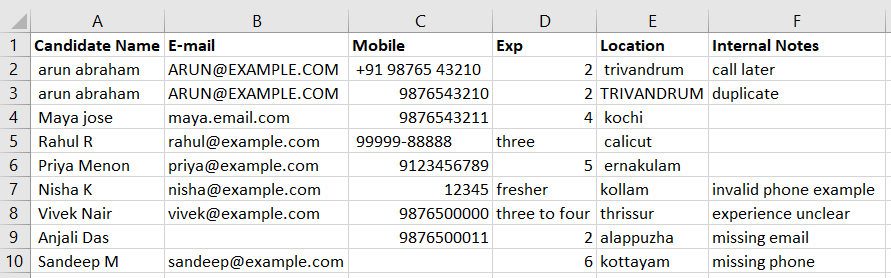
Before
Mixed casing, duplicate candidate records, inconsistent phone formats, invalid-looking email values, missing fields, and internal notes mixed with candidate data.
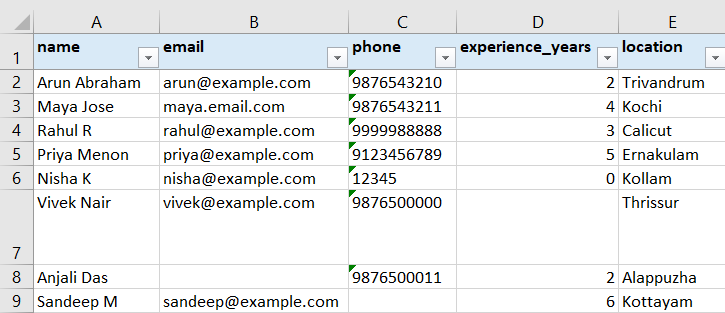
After
Standardized names, emails, phone numbers, experience values, and locations in a cleaner recruiter-ready sheet for calling and follow-up.
Review sheets generated
Cleaned_Data stays usable for calling and follow-up. Anything uncertain is separated into review sheets instead of being silently deleted or hidden.
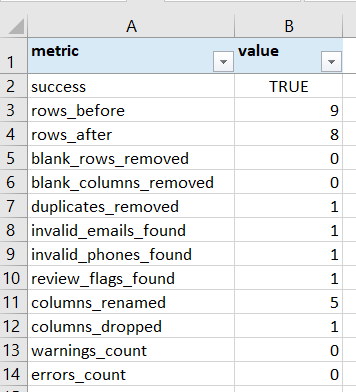
Summary
Quick counts show rows before and after cleanup, duplicates removed, invalid contacts found, review flags, renamed columns, and cleanup status.
Duplicates
Duplicate candidate rows are separated into a review sheet instead of being silently lost inside the main cleaned file.

Invalid contacts
Invalid-looking email or phone values are flagged in review sheets so your team can correct them before calling, sharing, or follow-up.

Review flags
Ambiguous values are not silently discarded. The workbook keeps the original value, affected field, candidate context, and reason for review.

What you receive
Test before paid work